Home Office Ideas: A Practical Workspace Setup Guide and Desk Inspiration
A home office is no longer a backup plan tucked beside the laundry basket; for many people, it is where meetings happen, deadlines land, and good ideas either flourish or fade. That makes workspace design more than decoration. A thoughtful setup can reduce physical strain, cut visual clutter, and make long tasks feel manageable. Whether you use a spare room or a narrow wall, the right choices can turn a patch of square footage into a dependable work zone.
Outline: The Five Building Blocks of a Better Home Office
Before buying furniture or moving cables, it helps to know what a well-planned home office is actually trying to solve. Most people are not searching for a picture-perfect room lifted from a magazine. They want a space that supports attention, feels comfortable during long stretches of work, and still fits the rhythms of home life. That is why this guide follows a practical sequence rather than a decorative one. It starts with location, moves into ergonomics, then explores desk layouts, visual inspiration, and the finishing details that shape everyday usability.
Think of the process like setting a stage before the play begins. If the chair is wrong, the lighting harsh, and the desk overloaded, even the nicest paint color cannot rescue the experience. By contrast, a modest nook can feel surprisingly capable when it is arranged with intention. A useful home office usually balances five factors:
• the right spot in the home
• a layout that supports movement and storage
• an ergonomic setup for screen work
• a desk style that matches the type of work being done
• lighting, sound control, and daily habits that keep the space functioning
Each of those factors affects the others. A compact desk may work beautifully in a bedroom corner, but only if storage goes vertical. A standing desk might sound appealing, yet it needs enough surrounding clearance to shift posture comfortably. A window can bring mood-lifting daylight, but if the screen sits directly in front of it, glare can turn a bright morning into a squinting contest. In other words, home office design is less about one perfect product and more about a chain of compatible decisions.
This outline also helps readers with different budgets. Someone furnishing a new room can use the full framework from the ground up. Someone working from a dining table can still borrow pieces of the method, such as improving monitor height, defining work zones, or adding a small lamp and drawer unit. The goal is not to chase a single aesthetic. It is to build a workspace that earns its place every day, whether you are a remote employee, freelancer, student, or business owner managing a full schedule from home.
Choose the Right Spot and Define Work Zones Before You Decorate
The location of a home office often matters more than the furniture inside it. Many setup frustrations begin with a simple mismatch between the task and the setting. A beautiful desk placed in a busy hallway may look impressive in a photo, yet it can become exhausting in daily use. Frequent foot traffic, television noise, kitchen activity, and blurred boundaries between work and home all chip away at concentration. When choosing a spot, the first question is not “Where can a desk fit?” but “Where can focused work actually happen?”
If you have a spare room, that room gives you the strongest boundary. It allows calls, storage, and mental separation. When a dedicated room is not available, look for areas with predictable quiet and stable lighting. Good candidates include:
• an unused bedroom corner
• a landing with enough depth for a compact desk
• a section of the living room away from the television
• a large closet converted into a “cloffice”
• a nook under the stairs for laptop-based work
Practical measurements help here. Many desks are between 24 and 30 inches deep, and a seated user benefits from enough room to pull the chair back without hitting a bed frame or shelf. A cramped placement can make even short tasks feel awkward. If your chair bumps into furniture every time you stand, the office will slowly become irritating, no matter how attractive it looks.
After picking the location, define zones. Even a small workspace can include more than one function. One zone may be for focused computer work, another for reference materials, sketching, printing, or charging devices. Zoning prevents the desk surface from becoming a dumping ground. For example, a wall shelf can hold notebooks and headphones, while a rolling cart handles supplies that do not need to live on the desktop. This small separation makes the main work area feel calmer and easier to maintain.
There is also a psychological benefit to zoning. When a lamp, tray, or pinboard marks the start of the workspace, the brain gets a cue: this is where work begins. That matters in homes where personal and professional life overlap all day. A defined work zone does not have to be large. It just has to be legible. A narrow desk facing a wall with a small organizer and one framed print can feel more stable than a larger desk floating in a visually chaotic room. Start with placement, protect focus, and let the decorative choices come later. The room will thank you in silence.
Build an Ergonomic Workspace Setup That Supports Long Hours
A well-styled office can still fail if the body dislikes being there. Ergonomics is not a luxury reserved for corporate headquarters; it is the quiet engineering behind a workday that does not leave your neck stiff and your shoulders hunched by lunch. The aim is simple: arrange the tools so that your posture is supported rather than constantly corrected by discomfort.
The chair is usually the first priority. It does not need to be the most expensive model on the market, but it should allow your feet to rest flat or on a footrest, support the lower back, and let your arms sit comfortably while typing. Fixed dining chairs often work for short sessions, yet they rarely offer enough adjustability for daily use. If the budget is limited, upgrading the chair usually brings more long-term value than buying decorative accessories.
Desk height matters too. Many fixed desks sit around 28 to 30 inches high, which works for many adults but not for everyone. The useful test is your posture at the keyboard: shoulders relaxed, elbows bent comfortably, wrists neutral rather than angled upward. If the desk is too high, a footrest may help after the chair is raised to match the surface. If the desk is too low, monitor risers and keyboard trays can sometimes restore balance. The point is not perfection measured with a ruler; it is reducing avoidable strain.
Monitor placement is another common trouble spot. A laptop on a desk often forces the neck downward, which is fine for short bursts but tiring over longer stretches. A laptop stand paired with an external keyboard and mouse can improve the setup dramatically. Common ergonomic guidance suggests placing the screen roughly an arm’s length away, with the top portion of the display near eye level. This helps keep the gaze neutral instead of tilted sharply down.
Useful ergonomic upgrades often include:
• a monitor arm for flexible screen height
• an external keyboard and mouse
• a footrest if the chair height leaves feet dangling
• a document holder for people who reference printed pages
• a sit-stand desk for users who like changing posture during the day
Comfort also depends on movement. Even a well-adjusted station cannot replace regular breaks. The familiar 20-20-20 rule for screen use, looking at something 20 feet away for 20 seconds every 20 minutes, can help reduce visual fatigue. Standing to take calls, stretching between tasks, and keeping water within reach all make the workspace more humane.
There is something quietly satisfying about a setup that fits the body well. You stop negotiating with the chair, stop craning toward the screen, and stop treating work like a physical obstacle course. When that friction disappears, attention has more room to settle on the actual job.
Office Desk Inspiration: Layouts, Styles, and Smart Storage Ideas
The desk is the visual anchor of a home office, but it should be chosen for the kind of work it needs to carry, not just the mood board it resembles. A writer with one monitor, a lamp, and a notebook needs something different from a designer using dual screens, tablets, cables, and sample materials. Desk inspiration becomes far more useful when style is matched with workload, room size, and storage habits.
Start with shape. A rectangular desk is the easiest to place and often the best choice for compact rooms. An L-shaped desk creates more surface area and can separate computer work from paperwork, but it asks for more floor space and careful cable planning. A wall-mounted floating desk can save visual weight in a small apartment, though it may sacrifice drawer storage. Standing desks appeal to people who like changing posture, while a classic wood desk with drawers suits users who want everything close at hand.
Here are a few practical desk directions and the kind of user each one often suits:
• Minimal desk: ideal for laptop users who value visual calm and low clutter
• Executive-style desk: useful for paper-heavy work and a formal backdrop
• Creative studio desk: better for makers, sketchers, and multi-tool workflows
• Compact corner desk: smart for bedrooms and shared spaces
• Adjustable standing desk: helpful for people who prefer movement throughout the day
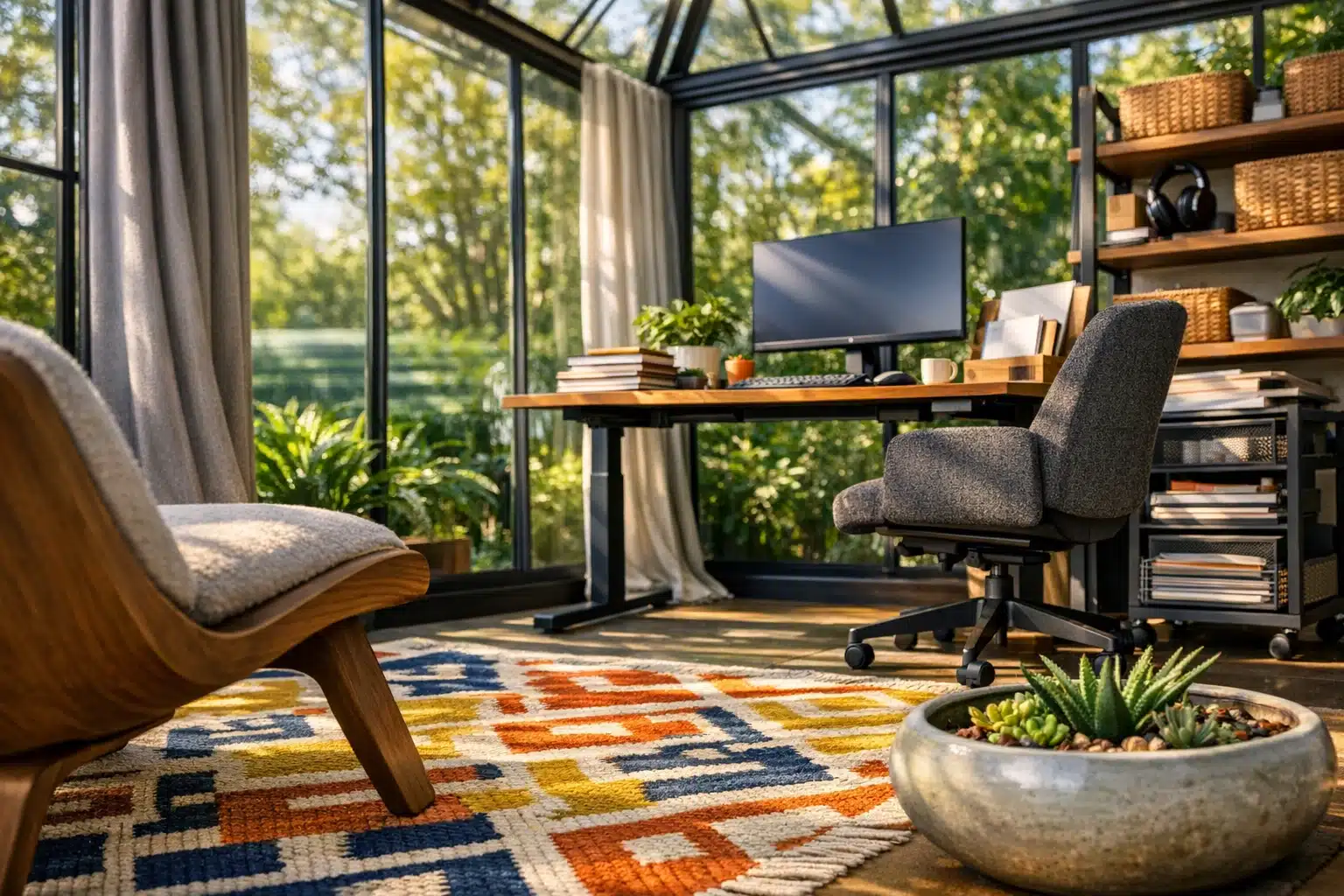
Placement changes the feeling of the desk just as much as the style does. Facing the wall can reduce distraction, which is useful for focus-heavy tasks. Facing the room may feel more open and sociable. Sitting perpendicular to a window often works well because it brings daylight from the side without blasting the screen with direct glare. Placing the desk directly in front of a window can feel inspiring for some users, especially if the view is calming, but it needs careful monitor positioning and shades.
Storage is where desk inspiration becomes reality. A beautiful surface loses its charm quickly when pens, charging cables, sticky notes, and unopened mail start colonizing every inch. If you prefer a clean look, build a “hidden storage” system with drawers, cabinets, or lidded boxes. If you like visible tools, use trays, pegboards, and vertical file holders so the arrangement looks intentional rather than accidental.
For small spaces, vertical storage is often the secret weapon. A shelf above the desk can hold books and decor, while a slim drawer unit below manages everyday supplies. A peg rail can handle headphones, scissors, and small baskets without eating desk depth. This is especially useful when the desktop is under 48 inches wide and every inch matters.
Style still has a role, of course. Warm wood can make a room feel grounded. White desks brighten dim corners but show cable clutter more easily. Black frames often look crisp and modern but can feel heavy in narrow rooms unless balanced with lighter walls or open shelving. The goal is not to copy a showroom. It is to create a desk arrangement that looks coherent at 9 a.m., still works at 3 p.m., and does not collapse into chaos by Friday afternoon.
Lighting, Daily Flow, and Final Thoughts for Remote Workers
Once the desk and chair are in place, the invisible qualities of a home office start to matter more: light, sound, rhythm, and maintenance. These do not always appear in shopping lists, yet they shape how the room feels over time. A workspace can have excellent furniture and still seem draining if the lighting is flat, the acoustics sharp, or the daily routine messy.
Natural light is usually the best place to begin. Daylight can make a room feel larger and more alert, and many people simply feel better working near it. Still, more light is not automatically better light. Direct glare on a monitor causes squinting and constant repositioning. A desk placed beside a window is often more comfortable than one placed directly in front of it. If sunlight changes dramatically during the day, simple window treatments such as sheer curtains or adjustable blinds can soften contrast without darkening the room too much.
Layered lighting helps when daylight fades. A good setup often includes:
• ambient light for general brightness
• task lighting for detailed work
• optional accent lighting for warmth and mood
A desk lamp with an adjustable arm is especially useful because it lets you direct light to papers, keyboards, or notebooks without flooding the entire room. Many people prefer neutral white light for focused work, often around the range used in practical task lamps, while warmer bulbs can help the office feel less sterile in the evening. The right choice depends on the job, the time of day, and your sensitivity to brightness.
Sound also shapes performance. Hard floors and bare walls can make calls echo, while nearby household activity can break concentration in small but relentless ways. Rugs, curtains, fabric wall panels, and even full bookshelves can soften a room acoustically. Noise-canceling headphones are useful for shared homes, but reducing noise at the room level often feels more natural than wearing a technological shield all day.
Then comes daily flow. The most efficient home offices support a simple routine: open laptop, find notebook, start work. If every morning begins with moving yesterday’s clutter, untangling a charger, or searching for a pen, the room is quietly taxing your attention. A reset ritual helps. Spend two minutes at the end of each day clearing the surface, plugging in devices, and returning supplies to their home. That small act makes the next morning feel less like a restart and more like a continuation.
For remote workers, freelancers, students, and hybrid professionals, the best home office is rarely the flashiest one. It is the space that respects your body, protects your focus, and fits your actual routine. Start with what you can control today: better light, smarter desk placement, improved monitor height, or a storage fix that removes daily friction. Over time, those grounded adjustments create a workspace that feels less improvised and more reliable, which is exactly what most people need from the room where modern work now lives.